NewOctober clinic dates announced:find out if it is for you →

Custom work.

Things we have built beyond Daybook. Invoice reading, reconciliation, dashboards, estimating tools. All fixed price, all handed over with the code. Every screen is real, with names changed.

Drawings

Every sheet, every revision, what changed between them.

Contracts

Head contract, subcontracts, variations, EOTs, the clauses that bite.

Procore

Budget, commitments, RFIs, claims, daily logs, schedule. Live.

Reports

Site diaries, inspections, engineer certificates, photos.

Invoices and email

Supplier invoices, claims, the project inbox.

What we build.

Five kinds of system. All of them run on your existing Procore, accounting and email. Nothing to migrate. Every screen below is real, with names changed.

A project agent

One place to ask anything about a project. It has read the drawings, the contracts, the reports and everything in Procore, and it answers with the page cited so you can check in one click.

It also notices things. A lintel added in Rev E with no variation raised. A claim that exceeds the commitment. A delay notice with a clock running on it.

Outcome: the project manager stops being the search engine.
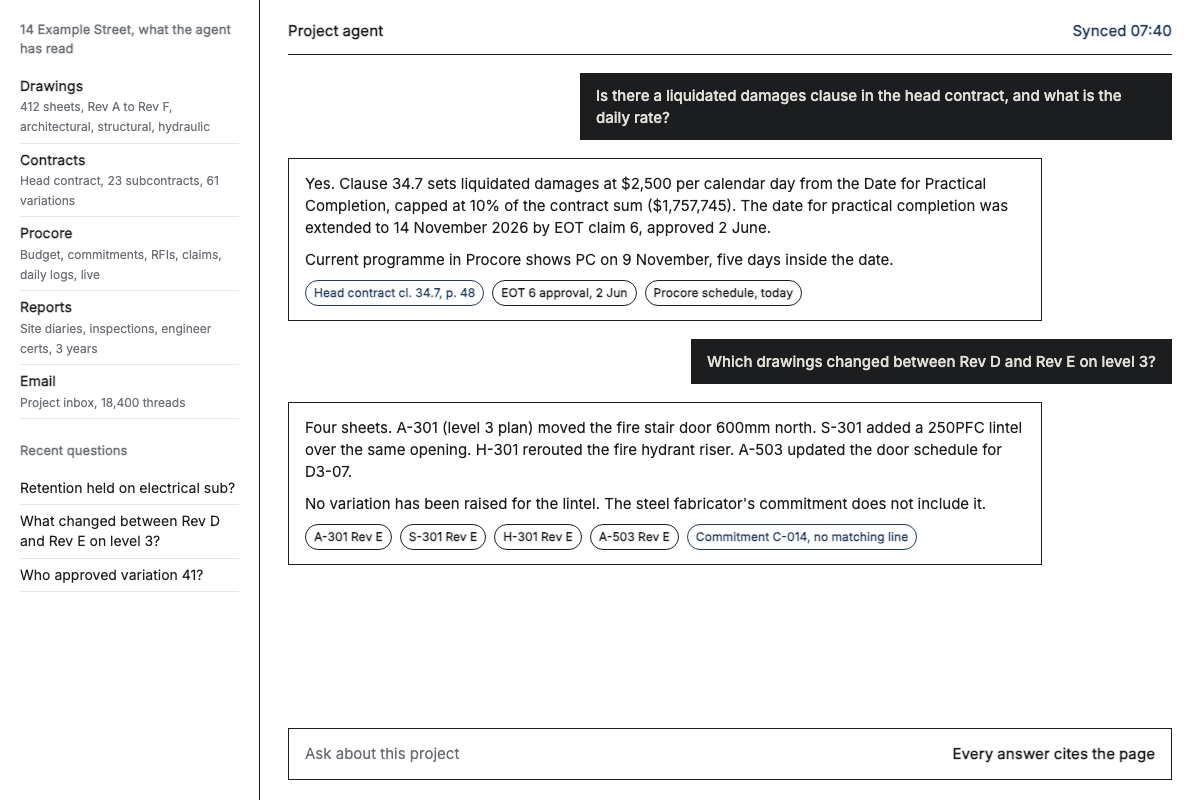
Project agent answering a contract question and a drawing revision question, each answer with cited sources

Invoices, claims and cashflow

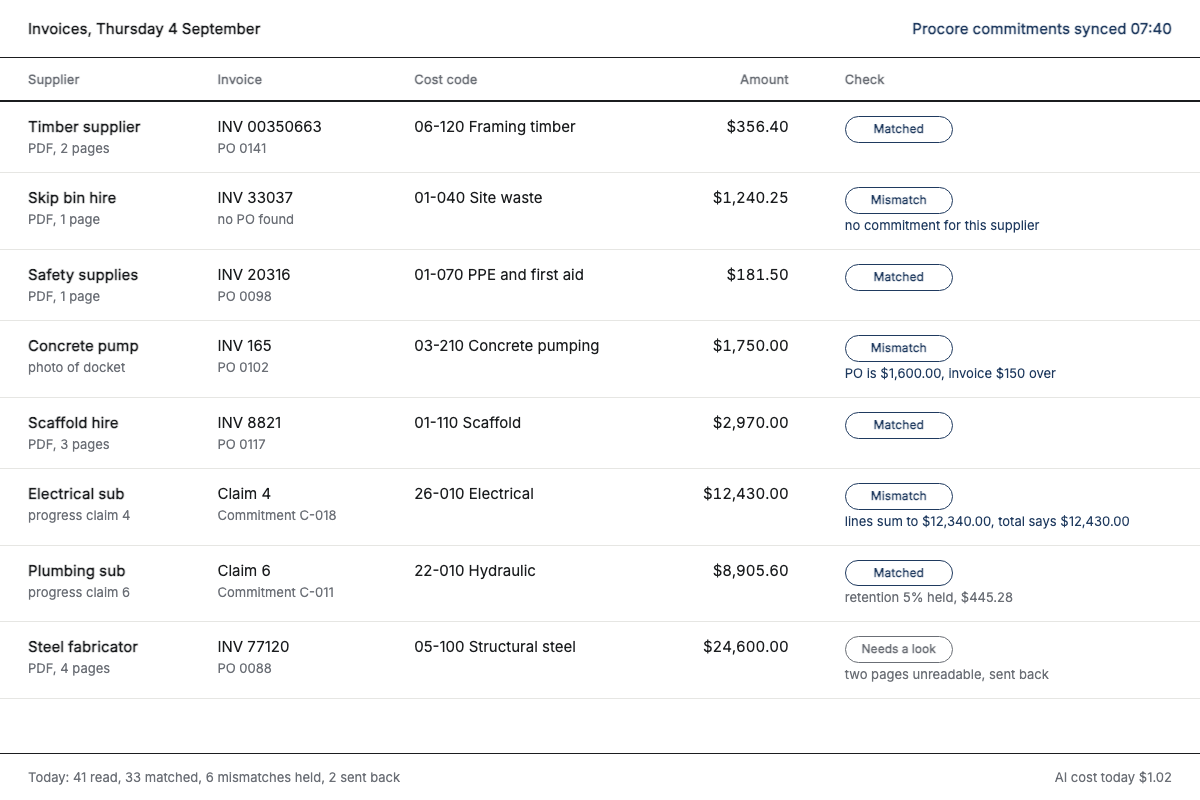
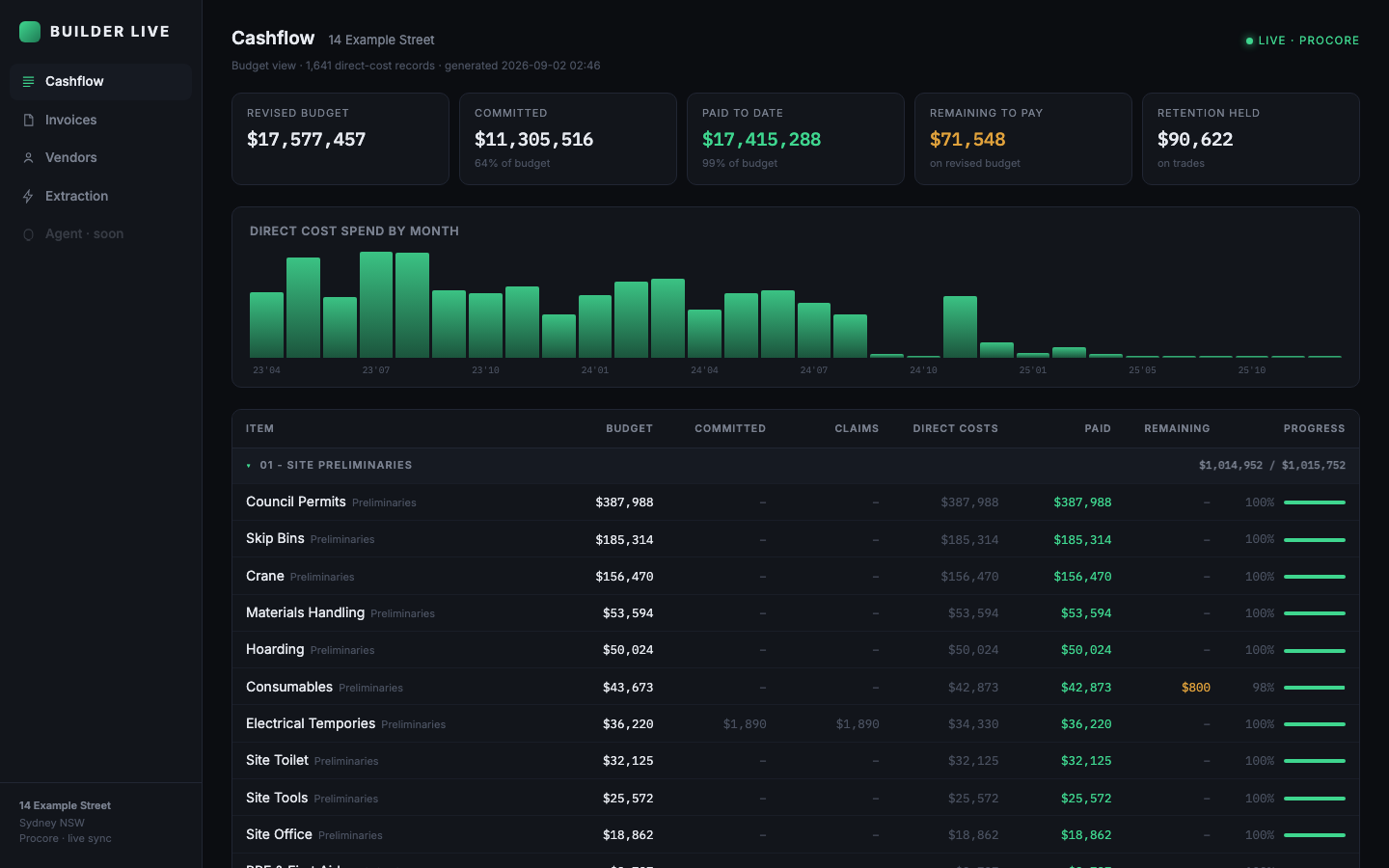
Supplier invoices and subcontractor claims read line by line, matched to the commitment, coded to cost codes and pushed into Procore for approval. A daily report of where Procore and Xero or MYOB have drifted, with the reason. One live page per project with committed, invoiced, paid, retention and forecast.

This is the work in the case studies: 1,641 invoices for $40.55, 93 mismatches caught.

Outcome: month end closes from a list, and you know your position today.

Invoice check screen with matched and mismatch stamps

Procore, set up and automated

Procore configured the way your business actually runs: cost codes, workflows, templates, permissions. Then the repetitive parts automated. RFIs drafted from the drawing and the question. Daily logs written from site photos and a voice note. Change orders raised from a variation email with the contract clause attached.

Outcome: Procore full and current without anyone typing into it at night.

Automations runningToday
Daily log
from 31 site photos and a voice note
Posted RFI 118
drafted from A-301 Rev E and the site query
Draft Change order 42
from variation email, cl. 36.2 attached
Draft Claim 7, plumbing sub
exceeds commitment by $3,180
Held Delay notice, steel
clock started 2 Sept, 5 days to respond
Flagged Weekly cost report
to owner, from Procore budget view
Sent

Estimating, takeoff and tenders

Your last three years of invoices become a price catalog: what you actually paid, per unit, per supplier, by month. Estimates start from that instead of from memory. Takeoff quantities pulled from the drawings. Tender responses drafted from your past submissions and the new brief, with the schedule of rates filled from the catalog.

Outcome: a quote that knows what the last job cost.

What we paid: scaffold hire5,404 lines, 160 suppliers
SupplierPer m² per weekLast paid
Scaffold hire A$4.10Jul 2025
Scaffold hire B$4.65Mar 2025
Scaffold hire A, 2023$3.40Nov 2023
New quote received$5.2027% over last paid

Figures illustrative. Real catalog in the cost catalog case study.

Custom software and dashboards

The tool that does not exist yet. An owner's portal that shows every project's position. A subcontractor claims page that fills itself from Procore. An integration between the two systems that were never meant to talk. Built small, fixed price, and handed over with the code.

Outcome: the spreadsheet somebody rebuilds every month stops existing.

Live cashflow dashboard showing project cost, committed, invoiced and paid figures

One workflow, before and after.

A subcontractor progress claim. This is what changes on the day it goes live.

Beforehandled by hand
  1. Claim arrives by email as a three-page PDF.
  2. PM checks it against the contract and last claim from memory.
  3. Accounts keys it into Procore, then again into Xero.
  4. Retention tracked in a spreadsheet nobody else can open.
Afterhandled by the system
  1. Read on arrival, matched to the commitment and previous claims.
  2. Checked against the contract sum, retention terms and the schedule.
  3. Drafted in Procore and Xero with retention posted correctly.
  4. You approve. That is the whole job.

Bring one project. We will show you what it finds in a day.

Twenty minutes, no slides. Drawings, contracts, a Procore login or a month of invoices.

Book a demo